YouTube Video Summarizer
Read a 2-hour video in 30 seconds. Paste a link to summarize YouTube videos: the TL;DR, the key takeaways and chapters with clickable timestamps — then ask the video anything you still want to know.
No link handy? Try it on a 1-hour talk →
No account for your first summary · videos in any language · up to 4 hours
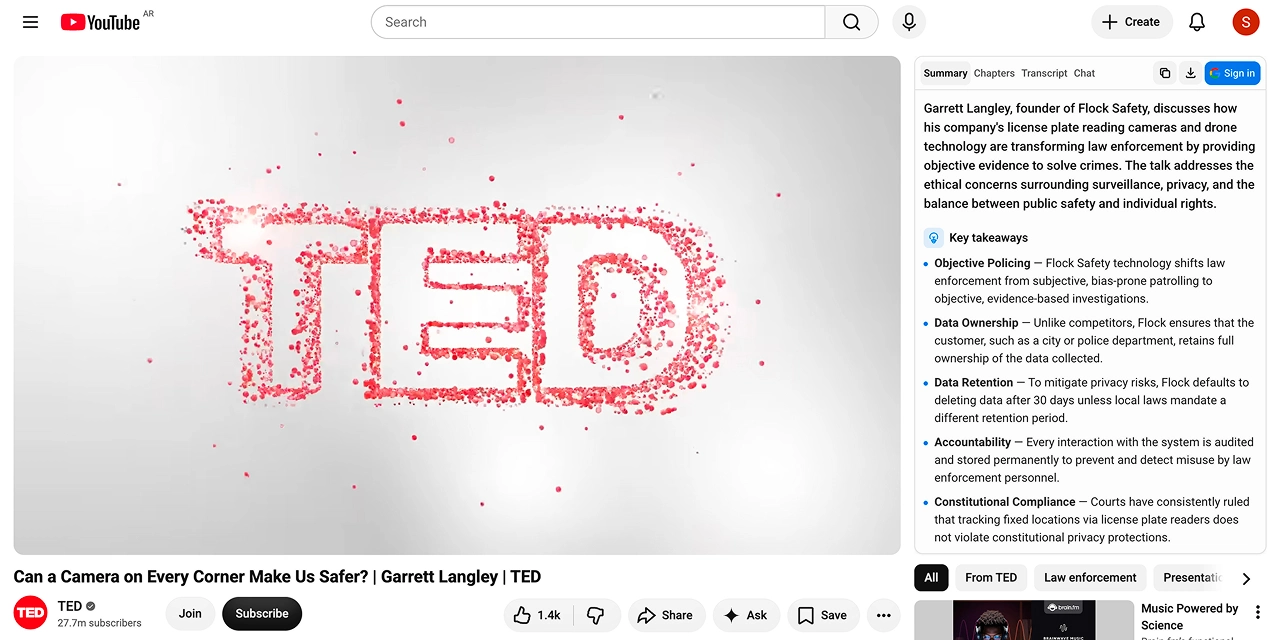
What you get for every video
Four views of the same video, generated in one pass — not four separate tools you have to run yourself.
Summary
A one-line TL;DR first, then key takeaways, notable quotes and action steps. Enough to decide whether the video is worth your next 40 minutes.
Chapters
The video broken into sections with real timestamps. Click one and the player jumps there — even when the creator never added chapters.
Transcript
The full text, timestamped and searchable — free on every plan, and unlimited in the extension. Copy it, download it, or click any line to jump to that moment. Only need the text? Use the free YouTube transcript generator.
Chat
Ask follow-up questions — “what did they say about pricing?” — and get an answer that points back at the timestamp.
How it works
- 1
Paste a YouTube URL
Any watch, youtu.be or shorts link. Lectures, interviews, podcasts, product reviews — up to 4 hours.
- 2
Pick your language
Free summaries come out in the video's own language or in your browser's. Pro translates them into any of 18 — switch and re-generate on the same page.
- 3
Read, ask, keep
Jump through the video by timestamp, ask follow-up questions, then copy the Markdown into Notion or Obsidian.
Or get it right inside YouTube
The same panel, docked next to the player on youtube.com. No copying links, no second tab — open a video and the summary is already there. What it asks permission for, and how it differs from this site.
- 3 free summaries a day — three times what the web gives you
- Summary, chapters, transcript and chat in one sidebar, without leaving the video
- Cached per video — re-open one you've already summarised and it's instant and free
- One account, one quota — history and Pro carry across the site and the extension
Works in Chrome, Edge, Brave, Opera and Arc
Who it's for
Four workflows this is built around, pulled from real user reviews.
You triage long videos
A one-sentence answer to “is this worth watching?”, before you commit 40 minutes to finding out.
You turn videos into posts
Takeaways, quotes and chapters from an interview — each stamped with the second it was said.
You research across many videos
Read the summary first. Skip the ones that miss your question, revisit the ones that answer it.
You keep notes in Obsidian or Notion
Markdown with the source URL, ready to paste — into a vault, a doc, Slack or Discord.
Why not just paste it into ChatGPT?
You can. It's four manual steps, and you lose the part that makes a summary usable — the timestamps.
| Here | Copy-paste into a chatbot | |
|---|---|---|
| Getting the transcript | Automatic, straight from the video | You find and paste it yourself |
| Timestamps | Every chapter and quote links to the second | Lost in the paste |
| Long videos | Up to 4 hours in one pass | Chunked by hand around the context limit |
| Coming back to it | Already summarised, instant, free | Start over |
| Where it lives | Beside the player, on YouTube itself | Another tab |
Simple, honest pricing
Start free, no card — five summaries a day for your first days. Upgrade when three a day stops being enough; the limits are printed on the box, not hidden behind credits.
Free
$0/mo
Forever · no card required
- 5 a day for your first 3 days, then 3 a day once you sign in — 1 a day without an account
- 3 chat questions a day about the video you're watching
- Full transcript, timestamps and summaries in the video's language or your browser's
- Copy or download as Markdown or .txt
Or just paste a link above — no install needed
Pro
Billed once a year · cancel anytime
- No daily cap on AI summaries — 500 a month, fair use
- 50 chat questions a day about any video you open
- Summaries in 18 languages, whatever language the video is in
- Everything in Free, on both the site and the extension
7-day money-back guarantee
Cancel anytime · 7-day money-back guarantee · card, PayPal, Apple Pay and Google Pay via Paddle · billing FAQ
Pro list price: US$9.99/month or US$71.88/year. Checkout shows the price in your local currency.
Questions people ask first
Do I need an account to try it?+
No. Your first summary of the day runs without signing in. Sign in with Google and you get 5 free summaries a day for your first 3 days, then 3 a day, plus history across the site and the extension.
What if the video has no subtitles?+
Then we can't summarise it yet. Summaries are built from a video's captions, and speech recognition for the ones without any isn't something we run today — it costs real money per minute of audio. Most videos on YouTube do have captions, including auto-generated ones. If you hit a video that doesn't, tell us: enough requests and we'll add it.
How long can the video be?+
Up to 4 hours on this site. A 2-hour podcast summarises in well under a minute.
Which languages does it support?+
Videos in any language are understood — the summary comes out in the language of the video or of your browser, free of charge. Reading it in any other language is translation, and that is a Pro feature: Pro turns any video into a summary in any of 18 languages. Follow-up questions can be asked in your own language either way.
Is this better than pasting a transcript into ChatGPT?+
It is the same idea without the manual work: we fetch the transcript for you, keep the timestamps so every claim links back to the exact second, and remember the video so you can come back and ask more. ChatGPT cannot open a YouTube link on its own, and a pasted transcript loses the timings.
What happens to the videos I summarise?+
We store the summary so re-opening the same video is instant and free, and your history is tied to your Google account. We do not sell data and we do not train models on your usage. Details are in our privacy policy.
Can I cancel whenever I want?+
Yes — one click in the account menu, and you keep Pro until the end of the period you have paid for. There is also a 7-day money-back guarantee, no questions asked.
Try it on a video you're procrastinating
Paste any YouTube link — from a lecture to a product review — and get the AI summary in seconds.